


Do you sell tiles, flooring or polystyrene by the pack, but want to show customers the price per square meter and make it easy for them to work out how many packs they need? That's exactly what we solved for the Centrum zateplení online store – and the result is a smart solution that saves time for customers and store owners alike.
Project collaboration with our client Centrum-zatepleni.cz
Specialists with many years of experience in thermal insulation systems and materials. They cover everything from facade design to the delivery of complete insulation systems. They sell both B2C and B2B. More at centrum-zatepleni.cz.

What we needed to solve
Polystyrene boards are sold in packs of 25 m². But a customer may need to insulate, say, 37 m². The goals were to:
- show the price per 1 m² (for fair, comparable pricing)
- automatically calculate the number of packs needed
- show the total volume in m³ and the recalculated prices
- add clear inputs instead of "quantity 1"
How we set it up
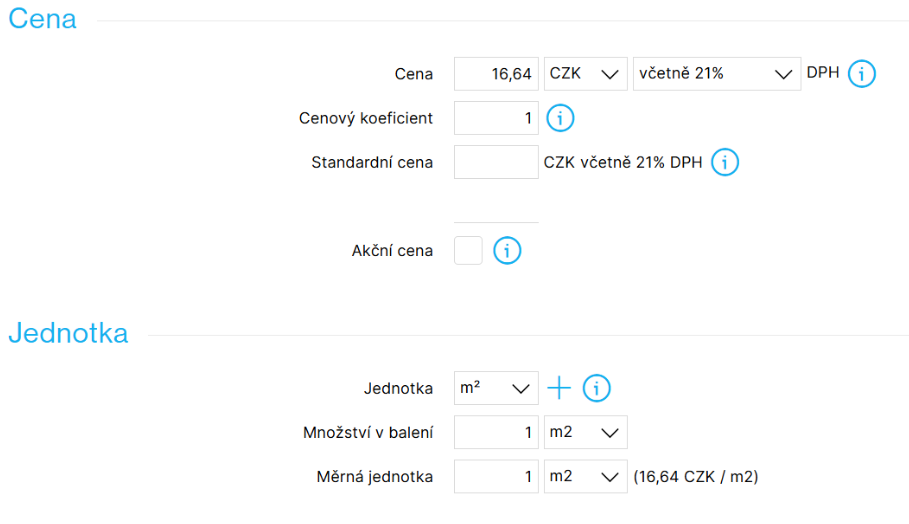
- The product price is entered per m²
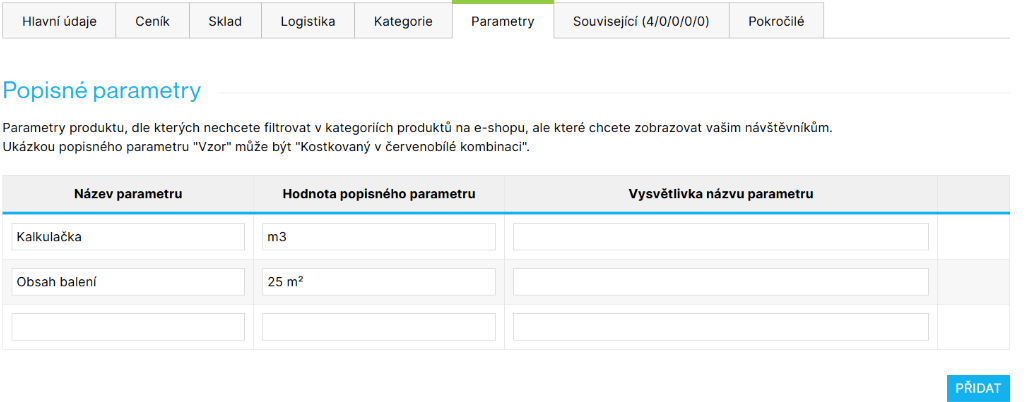
- The pack size (e.g. 25 m²) goes into the descriptive parameters
- The scripts read:
- the pack content
- the thickness, if relevant (to calculate the volume)
- other optional values (e.g. the number of pieces)
- The calculator then:
- shows an input field ("How many m² do you need?")
- works out the number of packs
- shows the resulting price per m² / pack / m³
- accounts for waste (e.g. 5% extra)
- keeps the total price and the conversion clearly updated
Why is it smart?
- The customer "doesn't have to think" about how many packs to add
- They see "the real cost before adding to cart"
- Search engines and marketplaces still index the correct unit price
- The template stays clean, with no variants and no recalculations in the admin
What does it look like in practice?
On products such as Styrotrade EPS 70 F – 10 mm thick you'll find an intuitive calculator below the price, where you:
- Enter the m² you need
- Choose the waste allowance, if any (0%, 5%, 10%)
- Immediately see:
- how many packs you'll need
- how much you'll pay in total
- the volume in m³
- the recalculated unit prices
All of it is clearly laid out, with an "Add to cart" button built right into the calculator.
What you need set up correctly in the store
For the whole system to work not only on the product page, but also in category listings and in the cart, two conditions have to be met.
Products as non-variant items linked together
If you want the price per 1 m² to be visible already in the category listing, and at the same time want customers to filter products by the price of each thickness, the best solution here is to enter each polystyrene thickness as a separate (non-variant) product.
These products are then linked to each other with the Product Linking add-on. That gives you:
- no misleading "from €0.80" price in the categories
- a separate price per m² for every thickness
- an easy way for customers to switch between thicknesses on the product page
Depending on what the client needs, the calculator can be used with variant products too, but the setup described above has proven to be the cleanest in practice — for pricing, filtering and comparison alike.
Buying in whole packs only
To make sure products can only be bought in whole packs (that is, in multiples of m²), you need to:
- set the minimum order quantity on the product
- use the Order in Multiples add-on
The calculator on the product page handles the correct quantity conversions before the item goes into the cart (based on the Pack content parameter), while the add-on enforces the right multiples in the cart itself. That keeps the whole ordering process consistent, and a customer can never order a "broken" quantity.
⚠️ One pitfall to watch out for
Search engines and price comparison sites (Google Shopping, Zboží.cz, Heureka) run automated checks that the declared price matches the price in the cart.
They typically check whether:
- the price in the feed matches the price on the product page,
- the price changes after adding to the cart in a way that could mislead the customer,
- there are differences caused by unit conversion or by an automatic increase in quantity.
When a customer enters 3 m² and the calculator rounds the quantity up to whole packs, "the bots can automatically run into a different price than the one in the feed". If that happens, the product (or the whole store) can be blocked temporarily or excluded from ads.
To solve this, we teamed up on the project with the marketing experts at Filipesmedia.
Project collaboration with Filipesmedia
E-commerce marketing specialists experienced with product feeds (Google, Heureka, Zboží.cz). They helped set up the outputs so they pass the checks run by the ad systems. More at filipesmedia.cz.

The solution from Filipesmedia
Each ad system needs a different approach. The product data in the XML feed has to be edited in an editing tool. Mergado is ideal for that.
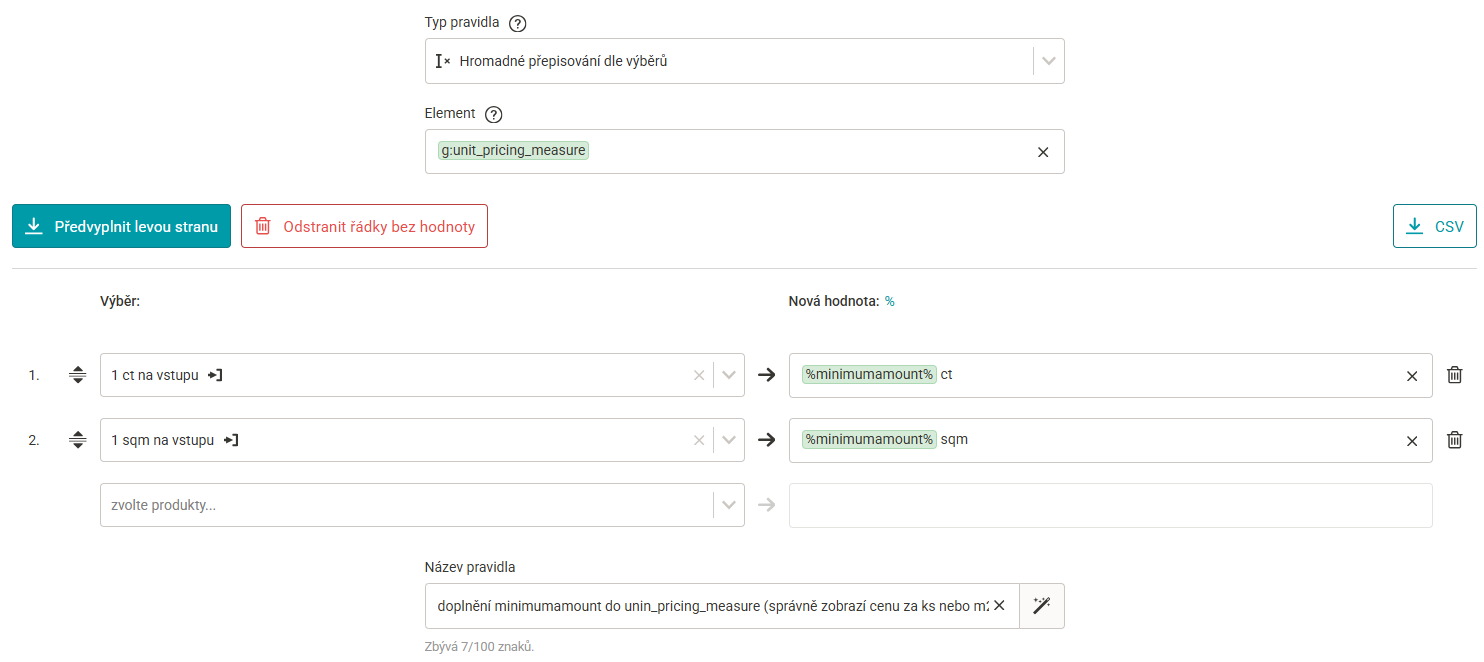
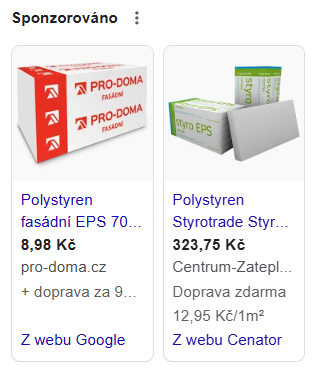
Google checks for itself whether the offer it promotes matches the price the product can actually be bought for on the site. If it doesn't, Google rejects the product. Shoptet already sends the price for the whole pack correctly in the feed — thanks to the minimum order quantity you filled in. What you do have to edit is the g:unit_pricing_measure element, where you enter the real quantity in the pack with the correct unit (sqm for m² in our case, ct for goods sold by the piece).
For each product, the value comes either from the Pack content text parameter or from the minimum order quantity. Neither of those is part of Shoptet's standard product feed for Google — so you have to add the value to the feed in Mergado with the Import data file rule.
Steps:
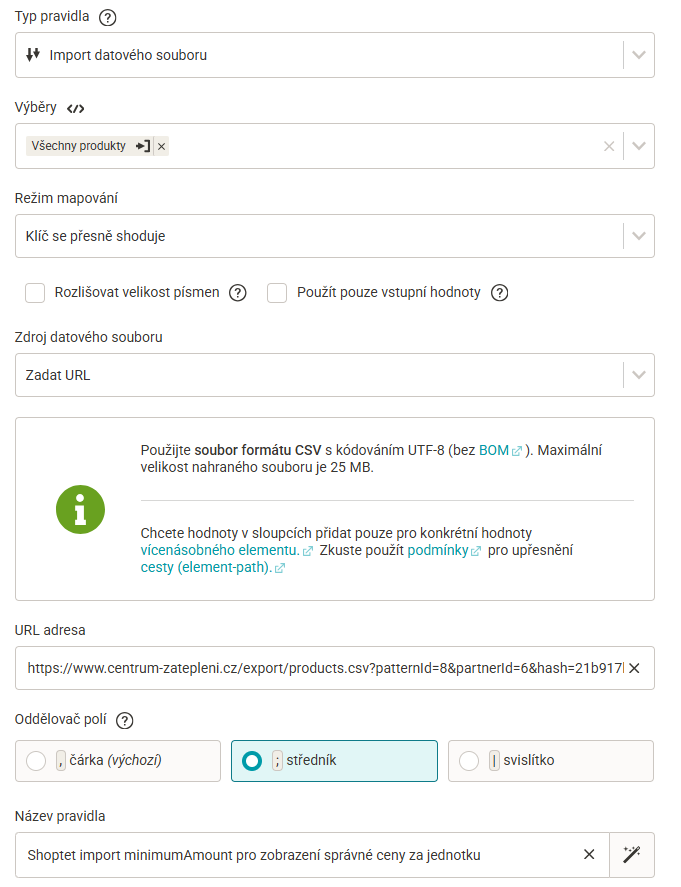
- First prepare a separate export with the elements you need as a CSV in Shoptet: admin Products – Export – Custom export, format CSV. A URL with that CSV file is generated at the bottom of the page.
- Use that URL to import the minimum order quantity values into Mergado (the Import data file rule).
- With another rule, "Bulk rewrite", write the imported values into the g:unit_pricing_measure element, including the unit you need —
ct(pieces) orsqm(m²).
The result: we send Google a product with the pack price and with the information on how many units the pack contains. Google approves the product and shows it in ads with the pack price plus the additional unit price.
Heureka
With Heureka, it always depends on how that type of goods is advertised on their portal — you have to adjust the data accordingly so Heureka matches you to the right product page. Products are often advertised as whole packs, the way they can be bought, and that is the case with polystyrene too.
Heureka requires the price for the whole pack and the pack size in the product name.
Steps:
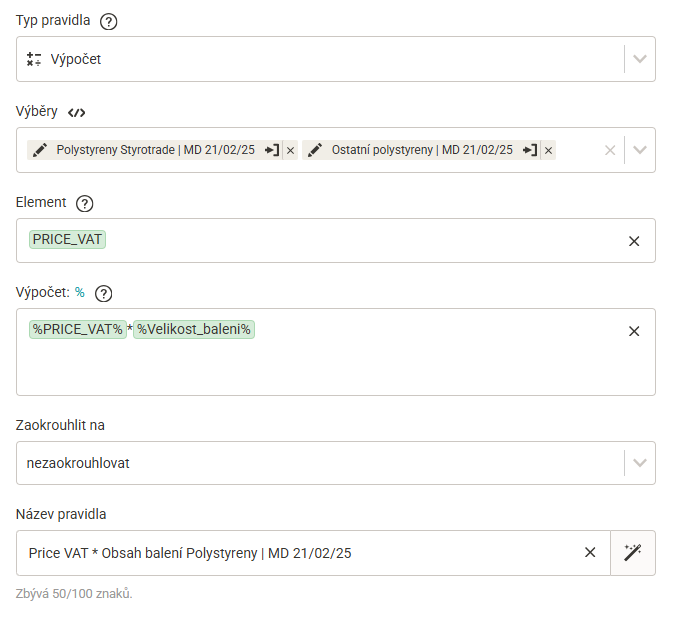
- Use the "Calculation" rule to multiply the price per m² by the pack content → the price per pack
- Use the "Rewrite" rule to build the name from the original name and the value of the "Pack content" parameter
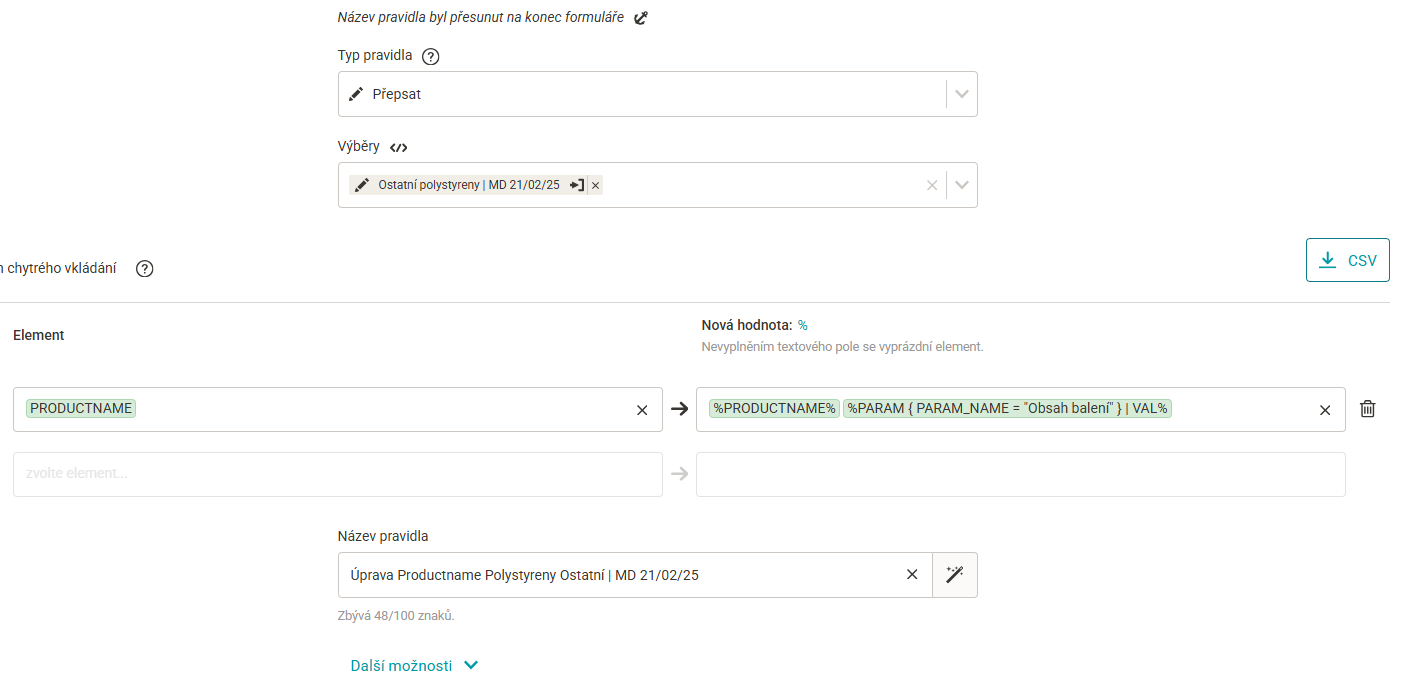
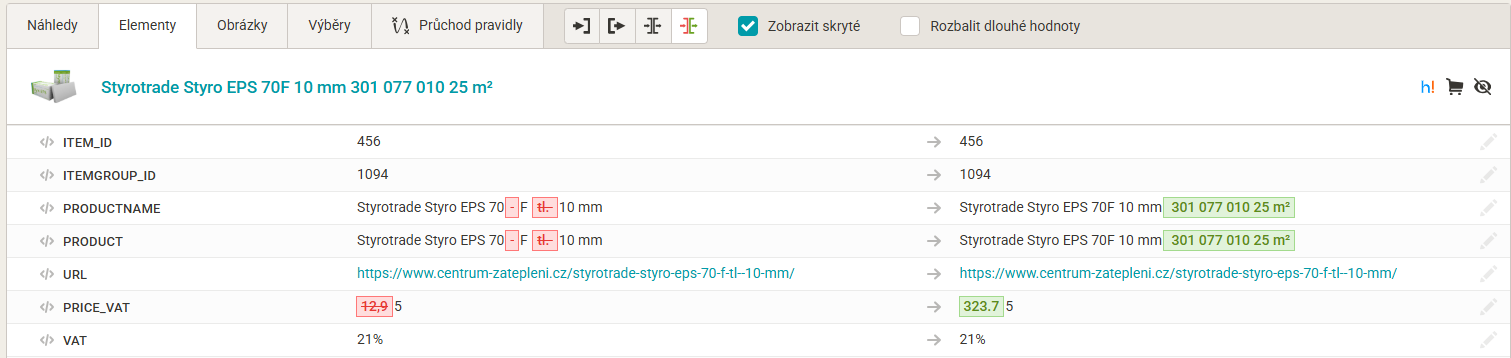
The result is a product with an adjusted name and a price based on the pack content, which Heureka approves and matches to a product page. What matters is that when Heureka checks the store, it sees the price for the whole pack on the product page, and that the whole ordering process really does run in packs.
Seznam
With Seznam, just like with Heureka, it depends on which product page you get matched to and how the goods are advertised on zbozi.cz — that is, whether they are sold in packs or "by the unit". Here the polystyrene is advertised at the price per m², so "there is no extra work in the feed". The product in the feed already carries the price per 1 m², so you only have to make sure the price per 1 m² is visible on the product page in the store as well.
Finally, we'd like to thank the FilipesMedia team, not only for their work on the technical solution itself, but also for the valuable know-how on ad systems and product feeds that went into this article. Combining the technical and the marketing point of view produced a solution that works for customers, search engines and price comparison sites alike.