


Why should I care about speed?
If you manage or own an online store, site speed has a major impact on the following points.
1. Impact on SEO (search engine optimization)
Every store wants to show up as high as possible when people search for its products.
- Search engine algorithms: Google and other search engines use loading speed as one of the main signals for ranking pages. Since 2021, Google has included Core Web Vitals in the algorithm that determines search positions.
- Page indexing: Slower pages may be indexed less often, which leads to lower visibility in search.
- Mobile-first indexing: Search engines now rank sites by their mobile version rather than the desktop one.
2. Impact on PPC (paid advertising)
- Ad quality score: Page speed affects the Quality Score in Google Ads. A higher score can lower your CPC and improve your ad position.
- Bounce rate: Slow loading leads to a higher bounce rate on the landing page.
- User experience: A fast page increases the chance of converting traffic from paid ads.
3. Impact on conversion rate
- User patience: 53% of mobile users leave a page that takes longer than 3 seconds to load.
- Credibility: Fast pages look more professional and build customer trust.
- Repeat visits: Happy customers are more likely to come back.
How do you measure speed?
1. Google Search Console
Google Search Console is available at https://search.google.com/search-console
- Core Web Vitals report: Shows metrics based on real user data from the last 28 days.
- Issue overview: Identifies pages with problems and gives recommendations for improvement.
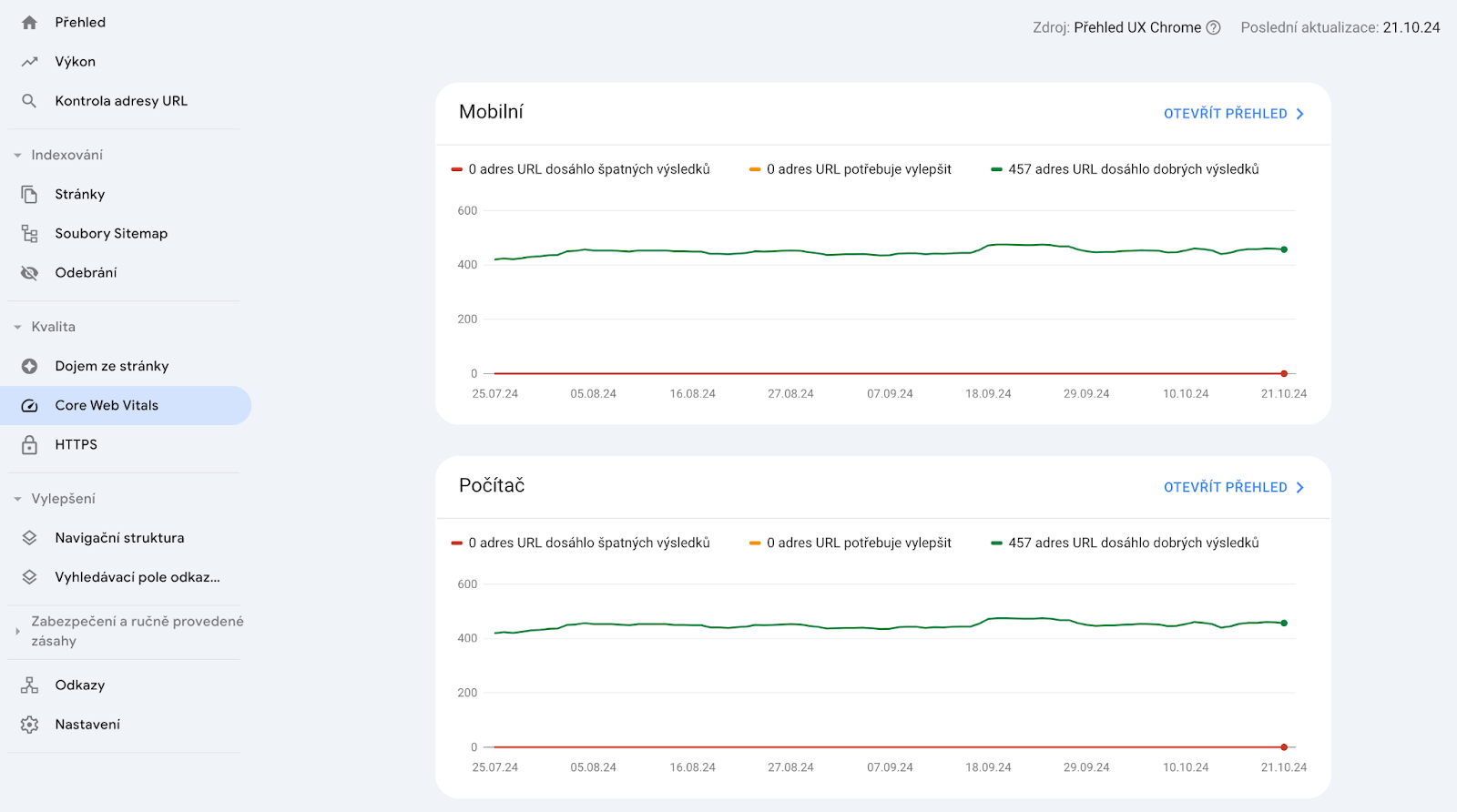
2. Core Web Vitals
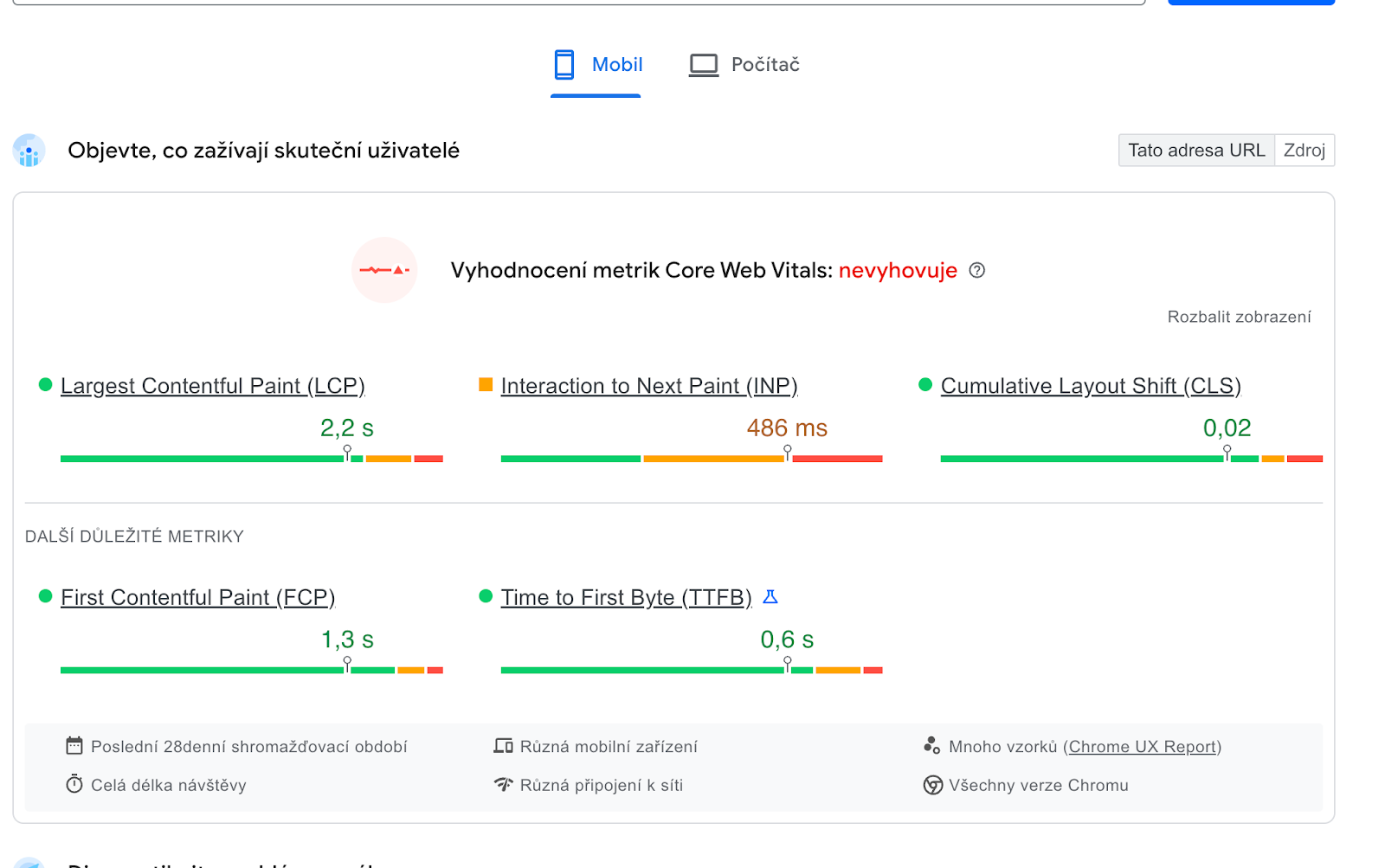
Core Web Vitals are a set of key metrics that evaluate the user experience in terms of loading, interactivity and visual stability.
a) Largest Contentful Paint (LCP)
- Measures: How long it takes to load the largest visible content on the page.
- Recommended value: ≤ 2.5 seconds.
- How to improve it:
- Load critical resources with high priority.
- Compress and optimize images.
b) Interaction to Next Paint (INP)
- Measures: The overall response time of the page to all user interactions.
- Recommended value: ≤ 200 milliseconds.
- How to improve it:
- Optimize the responses to user interactions.
- Minimize the load on the main thread.
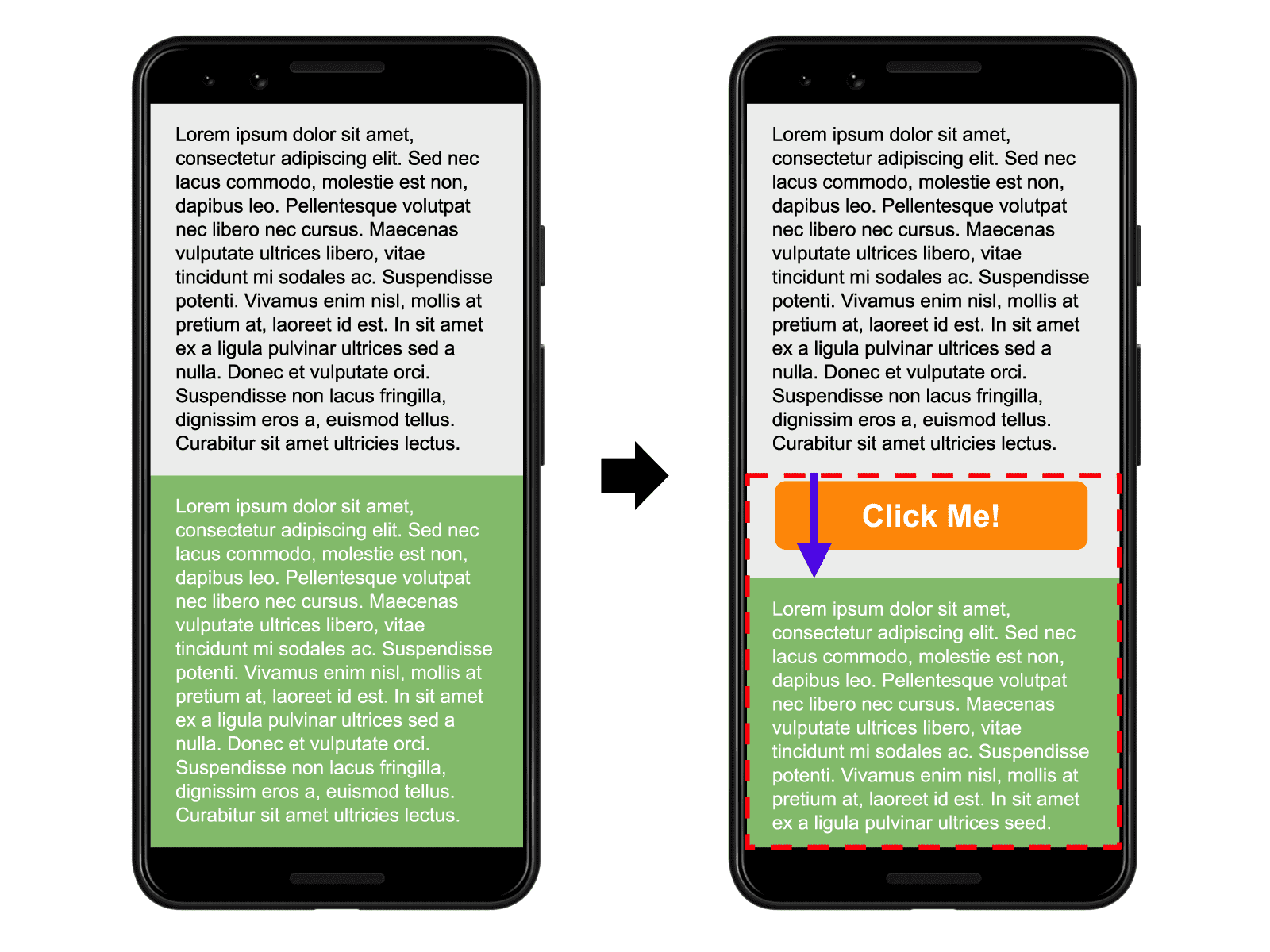
c) Cumulative Layout Shift (CLS)
- Measures: How much the layout shifts unexpectedly during loading.
- Recommended value: ≤ 0.1.
- How to improve it:
- Reserve space for images and videos with dimension attributes.
- Avoid inserting content above existing content.
3. Other measurement tools
- PageSpeed Insights: Provides both lab data and real user data with concrete recommendations.
- Lighthouse: A tool built into Chrome DevTools for in-depth performance analysis.
- WebPageTest: Allows detailed testing with different parameters (location, device, connection speed).
How do you fix it?
1. Code optimization
a) Minification and compression of files
- Minification: Removing unnecessary characters from HTML, CSS and JavaScript files.
- Gzip/Brotli compression: Enabling compression on the server to reduce the size of transferred files.
b) Async and deferred script loading
- Async and defer attributes: Using
<script async>and<script defer>for non-blocking JavaScript loading. - Critical CSS: Inlining critical styles in the page head and deferring the rest.
c) Removing unused code
- Code audit: Using tools to identify and remove unused styles.
- Modular JavaScript: Splitting the code into smaller parts and loading only the modules you need.
d) Prioritizing CSS – inlining critical CSS
- Critical CSS: The CSS that blocks rendering and drives up the CLS metric.
2. Image optimization
a) Lossless compression
- Tools: TinyPNG, ImageOptim, Squoosh.
- Automation: Making compression part of the build process.
b) Modern formats
- WebP: Offers better compression than traditional JPEG and PNG.
- AVIF: Even more efficient than WebP, but with more limited browser support.
c) Responsive images
- Srcset and sizes attributes: Serve different image sizes to different devices.
- Background images: Optimize CSS images with media queries.
d) Lazy loading
- Native lazy loading: Using the
loading="lazy"attribute on the<img>tag. - JavaScript libraries: For example LazyLoad for advanced features.
3. Using CloudFlare
a) Content Delivery Network (CDN)
- Geographic distribution: Servers around the world deliver content quickly.
- Lower latency: Content is loaded from the server closest to the user.
b) Caching
- Static content: Storing images, CSS and JavaScript for faster loading.
- Dynamic content: With Railgun technology you can cache dynamic content too.
c) Performance optimization
- Automatic minification: CloudFlare can minify HTML, CSS and JavaScript.
- Rocket Loader: Speeds up JavaScript loading.
d) Security
- DDoS protection: Blocks attacks that could slow the store down.
- SSL certificates: A secure HTTPS connection affects SEO.
4. Removing add-ons
a) Audit of installed modules
- Identify demanding add-ons: Find out which ones add the most to your load time.
- Weigh the benefit: Consider whether the feature outweighs the negative impact on performance.
b) Optimizing the add-ons you need
- Updates: Make sure all add-ons are up to date.
- Contact the developers: If an add-on slows your store down, ask them to optimize it.
c) Alternatives and integrations
- Custom code: Sometimes it's more efficient to implement the feature directly.
- External services: Consider using external services.
6. General recommendations
- Reduce font file size – Limit the number of typefaces and their weights.
- Reduce the number of redirects – Make sure URLs lead straight to the target page.
7. Third-party services
a) Third-party services – weigh what they add against site speed
- Clarity, Hotjar – do they really need to run all the time?
- Chat
- Notifications and trackers
8. More advanced techniques
a) Preloading, prefetching and preconnecting
Preload: Loads critical resources ahead of time.
<link rel="preload" href="styles.css" as="style">
Prefetch: Loads resources for future navigation.
<link rel="prefetch" href="next-page.html">
Preconnect: Opens connections to external resources ahead of time.
<link rel="preconnect" href="https://example.com">
b) HTTP/2 and HTTP/3
- Multiplexing: Allows several resources to load at once over a single connection.
- Server push: The server can send resources ahead of time.
c) Main thread analysis
- Chrome DevTools: Use the Performance tool to identify blocking scripts.
- Task splitting: Break up demanding operations with requestIdleCallback or setTimeout.
Practical steps for Shoptet stores
1. Use Shoptet's native features
- Templates: Pick a light, fast template.
- Image galleries: Use the built-in tools for image optimization.
2. Work with developers
- Consultation: If you don't have the technical knowledge, turn to specialists.
- Customization: Customizing your store may require advanced changes to the code.
3. Monitoring and continuous improvement
- Regular checks: Set a schedule for speed testing.
Conclusion
Optimizing the speed of a store on Shoptet is a complex task that needs a systematic approach. A fast store improves the user experience and has a positive effect on SEO, on the efficiency of PPC campaigns and on your conversion rate.
Implement the strategies above and monitor them regularly, and you can achieve significant improvements.
Sources
- Google Developers – Web Vitals - https://web.dev/vitals
- Google Search Console – Core Web Vitals Report - https://support.google.com/webmasters/answer/9205520
- PageSpeed Insights - https://developers.google.com/speed/pagespeed/insights
- Shoptet – Help and Support - https://podpora.shoptet.cz
- CloudFlare – Performance Overview - https://cloudflare.com/performance
- Mozilla Developer Network - developer.mozilla.org/en-US/docs/Web/Performance
- WebPageTest - webpagetest.org
- Chrome DevTools – Performance Analysis - https://developers.google.com/web/tools/chrome-devtools/evaluate-performance
- Image Optimization - https://web.dev/fast/use-improved-image-formats/
- Understanding INP - https://web.dev/inp/